Do you need a quick start guide for you or your team to learn more about Microsoft 365 and its suite of apps? I was able to pull together some of Microsoft’s best free training elements into one spot. Take a look at the Rise360 tutorial I built for a recent UNT course.
Good design is user-centered, no matter the product (Ruiz, Serral, & Snoeck, 2021). When it comes to designing mobile applications, designers must consider a smaller user interface (UI) that offers similar functionality to a desktop version of the same application. At the same time, mobile users are not always interested in the same features. Function aside, the visual experience for the mobile user is most definitely part of the choice to use one app over another. Designers must also consider the form or fashion elements of the mobile UI. In her 2018 TED Talk, Ingrid Lee, designer and self-identified joy-spotter, discusses the importance of finding joy in design and that tangible parts of our environment can lead to more joy in our lives.
Lee’s research into physical objects that lead to joy tells us that confetti and sprinkles are joyful, as are symmetrical objects like snowflakes or pops of color from rainbows. Some of this connects back to our evolution as human beings finding nourishment in ripe, colorful fruits in the treetops (Osorio & Vorobyev, 1996). What designers can take from this research is the fact that human beings are in search of joyful experiences, and with the choice of so many apps for the same types of function, the UI design must create a welcoming experience to be successful.
Apple Weather: Good balance between function & fashion
While only receiving a 3.8 out of 5 stars rating, Apple’s Weather appis a great example of joyful, thoughtful design with high functionality. The simplicity of the UI provides information about the weather for the day without overwhelming imagery. The icons used to depict various types of weather are commonly used across the web and the font choice is sans serif leading to improved accessibility. The playful nature of the graphics for various types of weather provides an immersive user experience. When it’s raining outside, it’s raining in the app with the details listed on top of the weather imagery. Even the screen that enables the user to see multiple cities at once has animated weather from each city. The high/low temperature menu was also recently updated to provide a more graphical display of the temperature with appropriate color used to signify cooler versus warmer temperatures. Apple designers are well-versed in color theory and joyful design. While ratings may not be high for the level of detail some users are seeking from a weather app (from only 666 ratings), users continually return to Apple’s Weather as a choice for visual appeal and easy-to-find weather information.
screenshots of Apple’s Weather app
Amazon Shopping: Poor balance between fashion and function
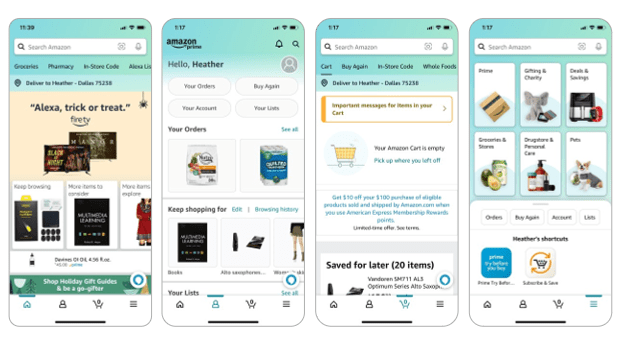
With 4.6 million ratings, Amazon Shopping receives a 4.8 out of 5 stars. It is obvious from the screenshots displayed in the App Store that Amazon has prioritized function for mobile users in the form of shipping notifications, changing your password, visual search features while in a store, and live chat support. These are important features for users on-the-go. However, the UI design follows no logical pattern for color theory with an aqua/minty blue green used in spots with brown packaging also mixed in. The opening screen has too many choices for users on such a display it is difficult to know where to start and users may become too distracted and not remember why they even opened the app in the first place. The icon choices have no words and are not intuitive for a novice user to know where to start unless you are simply looking to search Amazon for products. Sharp edges and too many visual menus do not meet the previously mentioned joyful design standards.
screenshots of the Amazon Shopping app
References
Osorio, D., & Vorobyev, M. (1996). Colour vision as an adaptation to frugivory in primates. Proceedings of the Royal Society: Biological Sciences, 263(1370), 593-599. https://doi.org/10.1098/rspb.1996.0089
Ruiz, J., Serral, E. & Snoeck, M. (2021). Unifying functional user interface design principles. International Journal of Human–Computer Interaction, 37(1), 47-67. https://doi.org/10.1080/10447318.2020.1805876
The last eight weeks have been both rewarding and challenging as I navigated my first formal instructional design course at UNT. I can wholeheartedly admit that I have a deep appreciation for instructional designers (IDs) and complexities of this role than ever before. I am also excited about using what I’ve learned in this course in my current role as I work to build a team that researches new edtech tools, evaluates current edtech strategies at my university, and develops training materials to support our faculty.
As the theme of the summer has been one of reflection, both professionally and personally, this post is filled with what I’ve learned, the importance of course material/textbook selection, and where I’m headed next.
A few lessons learned about instructional design
1. The development of elearning content is much more complex than the tools convey.I have a knack for grasping edtech tools relatively quickly. It may be because I’m not afraid to click a button or try something out and completely delete it later (no matter how much time it took to create). I’m not sure where this skill comes from, but I’m grateful to have it. This ability to quickly learn a tool, however, did not help me when I was the designer of the learning experience. There is a separate skill set required to examine the content, select the appropriate method for displaying/producing the content, and consider the individual learner’s needs at the same time. I would guess some individuals have both the design and the development skill, but I would argue that in order to create exception courses/training materials that you need a team with the ability to specialize in one or the other. In short, quality instructional design requires a team.
2. Templates and examples are essential, both for new instructional designers and students in any course. Providing a course design template or instructional engineering document to an ID offers a bit of structure for all the creative energy required to develop a course. It also follows what we know about cognitive processing in that priming the learner through applicable examples can help them move from knowledge to application of the knowledge more quickly. Too much new information overwhelms working memory.
The same was true in my course development in that new project managers need to see completed project documents from a past project in order to see how their project fits into a similar framework. In short, learning occurs in context (Driscoll, 2002), we must always provide examples and/or templates.
3. iterate. iterate. iterate. An agile approach to instructional design allows for iteration throughout all stages of the ADDIE model. This is the most valuable lesson I learned this summer. Getting something for the client to look at quickly allows you to make tweaks to the design throughout both the design & development process. It will also ultimately save you time in the development stage in case there is a flow to each module related to structure of the content items. Solidify Module 01 before creating Module 02 — fix it once, as opposed to seven times in seven modules. (I did not do this, but will most definitely do it next time). Rapid design and development will benefit you in the long run. In short, spending more time up front will save you a lot of time later.
Course resources: Know your audience
We used Piskurich’s 3rd edition of Rapid Instructional Design: Learning ID Fast and Right for the course. I found it helpful in terms of templates for specific types of learning experiences. He shared a fantastic survey tool to gauge learner satisfaction upon completion of the course. However, because of the approach to the writing, I struggled to want to read the text. I wanted less conversational writing and more structure how-to’s. The author spent more time trying to figure out how to give all audiences — from novice to expert — something in his book when his time would be been better spent focusing on one group. When you flip back and forth between introductory and mastery level material, the flow of the text is not helpful to either audience.
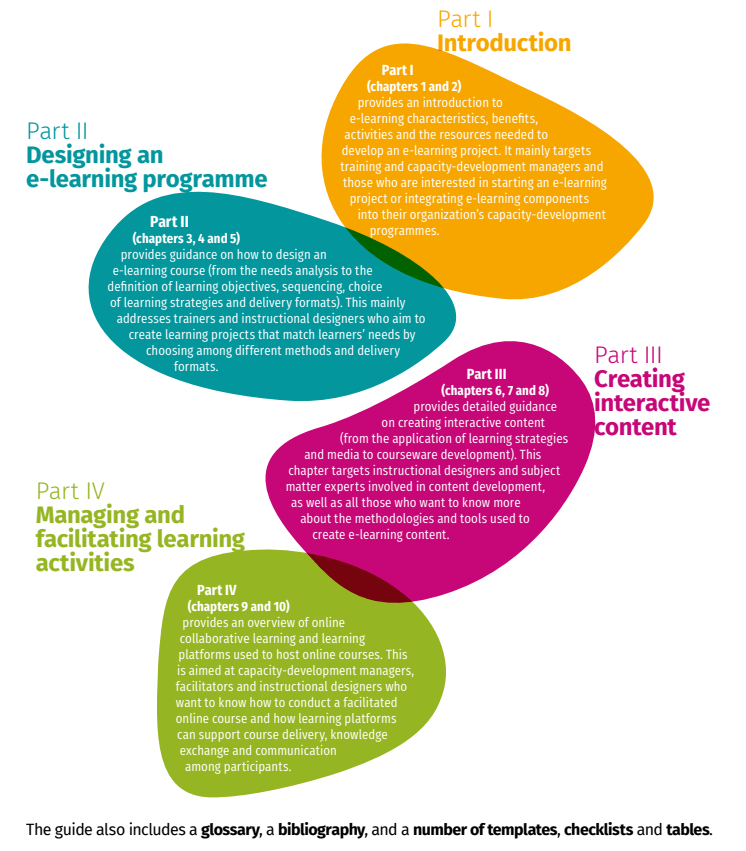
My thoughts on the text may also be clouded by the fact that I developed elearning modules over face2face training. While the author mentioned elearning, the focus of the text was primary for classroom-based course design. Our professor did share the FAO eLearning methodologies book that I found amazingly helpful. The structure of the text focused on core aspects of instructional design that apply across any course/training module, but keyed in on particular aspects to consider for how to chunk content depend on the goals of your elearning module, interactive creating interactive content with various courseware options, and the management of course facilitation depending on learner needs.
Table of Contents for FAO (2021). E-learning methodologies and good practices: A guide for designing and delivering e-learning solutions from the FAO elearning Academy, second edition. Rome. https://doi.org/10.4060/i2516e
The FAO methodologies resource and the iDEA Book by iDesign that I have shared in the past are fantastic tools for instructional designers and faculty designing online courses this fall. They provide both the background on instructional design as well as practical tips and easy-to-follow guidance for utilizing instructional design that benefits individuals at any level of experience.
The field of instructional design
I am a learner and an educator. I possess a deep desire to constantly improve and learn everything I can about a given topic, and right now I am most interested in how humans learn and the most effective strategies to help them learn. The field of instructional design captures all my interests and presents opportunities for growth as society changes and new technologies or challenges present themselves. Humans always need to learn something, we are constantly evolving as a species. There is also so much to research and evaluate within the field of instructional design as it relates to elearning and the use of multimedia.
I am not looking for a new job, I love my team and the direction our work is headed. However, I am grateful for UNT in providing this course with the learning technologies graduate program as it provides a springboard into the ID field that opens doors for students while also providing immediate applicability to their current jobs. As COVID continues to impact our working world, instructional designers will become increasingly valuable commodities to assist corporations and educational institutions in migrating to a more fluid workforce. The lines between home and work will blur permanently. This requires learning across generational boundaries, and instructional designers are just the group to help us navigate this new space.
As always, thanks for learning and reflecting with me.
Instructional design should be an iterative process. My current UNT course on instructional systems design has setup multiple opportunities to reflect and review the course we’ve been designing for a chosen client. With my client being a department at my university, it’s an opportunity to ensure a quality product for the university while also practicing my instructional design skills for future courses. In considering various activities for learners in the training course I’ve designed, most of the activities I offered were based on the tools provided by the Rise360 platform and my own preferences for learning new information. The concept of visualization was presented by our professor through an activity called the method of loci. According to The Art of Memory, Inc., the method of loci is a “method of memorizing information by placing each item to be remembered at a point along an imaginary journey. The information can then be recalled in a specific order by retracing the same route through the imaginary journey.”
A memory palace example from The Art of Memory, Inc. to assist with the method of loci technique.
Our professor shared this technique and asked that we practice it while using Wilson’s view of situated instructional design as something to memorize. While this is not difficult information to grasp (for more on Wilson check out his Google Scholar page), it was new to me. This is a new technique and new information, it was challenging to grasp both at the same time. The cognitive load was too great to fully lean into the technique and reap the benefits of the visualization exercise.
However, I think with a few modifications it could be a useful exercise in an online course.
First, the information to be memorized should be presented through a separate means ahead of the exercise. Had I been given an article to read on Wilson’s view of situated instructional design instead of citing the key points to memorize I may have been able to connect the visualization to my past knowledge gained after reading the article.
Second, audio instructions may have helped with the explanation of the activity. By having to read instructions on a screen for a visualization activity, I was unable to close my eyes and truly visualize.
And third, using a simpler example to learn the method of loci technique then applying it to something more complex, like Wilson’s instructional design, would have been more effective. Possibly using a sequence of colors or numbers and placing them around a room would have been enough to see the effectiveness of this memorization technique.
I’m reminded of Mayer’s principles from his cognitive theory of multimedia design. The pre-training principle, one that falls under the category of managing essential processing in order to focus on the actual material needing to be learned, that people learn better from a multimedia lesson when they know the names and characteristics of the main concepts. It’s possible that if I had learned the method of loci technique with less complex information ahead of time or if I had seen Wilson’s articles on instructional design ahead of the exercise that I would have found greater value in the method of loci. Nevertheless, I find visualization activities do have value in learning new material, but for an online lesson will need the use of audio to allow the learners to actually close their eyes and lesson to the visualization instructions if it’s the first time they are experiencing the technique. In fact, this technique could be valuable for the type of training course I’m working on currently as learners could visualize the phases of the project framework to assist in memorizing the phases for future use.
ADDiE – implementation
Visualization is a form of reflection in that you are recalling information from long-term memory back into working memory to use it again. I am finding great value (as I’ve mentioned in nearly every post this summer) in reflection to reconsider design aspects of the course I’m working on. In planning for the implementation of the training course, I sent my thoughts to my client for review. She and I both are questioning the location in which to store the course materials where they can be be most beneficial for learners while simple to maintain for the client. Microsoft Teams is a potential solution for the virtual ‘home’ as it can also be used for collaboration among the learners after the course is completed as well. Project managers at the university are distributed throughout various departments and could find value in a spot to stay connected. Microsoft Teams is designed for this specific task.
In spelling out potential issues with the current state of the course materials, I called out the use of Microsoft Excel as a stand alone document for the Project Roadmap. This caused the client to start thinking about other options. As I am the instructional designer for the course as well as a learner within the course, I mentioned the use of Teams as a solution for housing the documents to ensure version control for the ASI Office but also for learners to submit as part of the course completion. This allows for others learning project management strategies to see other examples. It also keeps these individuals part of a learning community by which they both contribute to and learn from.
I am constantly considering how learning communities are a system whereby we contribute and receive information leading to new knowledge creation over time. Considering a systems approach to a training course fits with the Agile approach to project management the University is moving towards with regards to any technology rollout. Offering opportunities to practice the use of Agile within any aspect of the University will help employees grasp the concepts more easily.
addiE – Evaluation
The use of Teams for housing course materials also allows for surveys to be open for all users and data to be immediately reviewed through the use of Microsoft Forms. The University is attempting to grow the use of the Microsoft tools across all departments to cut costs with other providers (like SurveyMonkey). The Microsoft Automate tool is also a helpful feature to setting up notifications anytime a survey is administered or a learner is added to the Team. I look forward to using Teams for this training course, as well as learning more about the tools offered by Microsoft as part of this project.
As always, I appreciate a reflective course assignment as it forces me to slow down and think as opposed to ‘just do’– as an Enneagram One, I tend to be a doer and live in the present moment. The reflective aspect of instructional design and the iterative nature of the work are helping me grow not only as a professional, but also as a more competent human being. I’m glad to have you on this journey with me.
Until next time, thanks for listening and learning.
eLearning is now prevalent across K12, higher education, and corporate learning environments. EdTech companies have provided a multitude of options for these various sectors to select the appropriate presentation method for specific audiences. But not all eLearning platforms are created equal, nor do they all follow any sort of cognitive theory for improving learning based on the challenging user experience of some platforms. EdTech providers and educators alike would serve their customers, i.e. the student/learner, better by considering Richard Mayer’s cognitive theory of multimedia learning. Mayer (2017) combined what we know of information processing theory and cognitive load theory, as well as dual coding theory, and applied it to the use of multimedia in the design of elearning experiences. His combination of these theoretical perspectives can assist teachers and instructional designers in crafting easy-to-digest learning units for students.
Consider these assumptions.
Learning takes place in an active state whereby learners are filtering information, selecting specific information, organizing it, and then integrating that information with prior knowledge (information processing theory).
There are two separate channels to process information: auditory & visual (dual-coding theory).
Each of these channels has a finite capacity for receiving information (Sweller’s cognitive load theory).
Mayer proposed 12 multimedia instructional principles based off these assumptions as part of his cognitive theory of multimedia learning (Mayer, 2017). These principles are grouped into 3 categories aimed at minimizing extraneous processing (processing needed that is unrelated to the learning objective), managing essential processing (needed to mentally represent the material), and fostering generative processing (making sense of the material). I’ve been working on a training course using Articulate’s Rise360 platform for the last few weeks, and Mayer’s theory resonated with some of the benefits I’ve found in the platform but also brought to light some areas I need to examine in more depth as we consider revisions to the course. More specifically, the three principles that help to foster generative processing (helping learners to organize and integrate new information into working memory) could be used to improve this course.
With a focus on generative processing, the human emotional connection to the material improves. Adding an audio component to several instructional widgets improves the encoding of the information. With several audio elements already part of the course, it’s worth reviewing the tone of the audio recording to ensure a personal approach. The personalization principle (Mayer, 2017) tells us that people learn better from multimedia lessons when words are spoken in a conversational style rather than a formal style. I personally relate to this principle as I prefer a more conversational nature to any video I watch, but never knew there was theory and research behind it. Reading Mayer’s 2017 article in the Journal of Computer Assisted Learning affirmed my decision to start this degree program with UNT — I have always felt that developing an emotional connection to the material helped me to learn and my students in past courses to retain the material better.
Appealing to the nature of being human — the connections between people — helps us be better humans and helps us learn. We are meant to go through life with a community, Mayer’s cognitive theory of multimedia learning provides evidence that we still want to feel part of a human community even through elearning experiences…an entire research agenda could be developed off this one statement. The voice principle, whereby people learn better when the narration in multimedia lessons is a friendly human voice rather than a mechanical machine voice (Mayer, 2017), confirms my prior experience as well. I think about how using a Powtoon video to draw or write out examples in the training course while speaking to the examples might help with encoding over just providing a picture of a completed example. Helping learners to organize information into existing schemas, connecting the information to prior learned material — this is where the instruction leads to learning and application.
One final comment on how I might use Mayer’s principles in this training course relate to symbols and imagery. My client is looking to improve the iconography used within the training course to give the material a lasting impression with learners. The course is training individuals on a framework used to organize projects, and the framework contains five phases. Each phase is currently identified using a simple icon. The multimedia principle Mayer explains states that people learn better from words and pictures than just words alone. Adding a word near the icon/image may help with retention of the information in the course. Working with the marketing department or one of the instructional technologists who has experience in graphic design might be a good next step here.
Future Research
Even with lessons designed to reduce extraneous processing and activities focused on simplifying essential processing, tapping into the social element of the learning experience is still critical to get learners motivated to continue learning. Mayer’s generative processing principles dig further into this aspect of learning. Social cues in the lessons help the learner to see the instructor/facilitator as a partner. Using voice instruction in a friendly, conversational tone helps the learner develop a social partnership (Mayer, 2017) which can ultimately lead to better outcomes. We can use on-screen agents to increase the social nature of eLearning experiences. And while Mayer has helped get us started, there is vast opportunity for additional research in the application of the lab-designed principles he has postulated. Examining the role of motivation in multimedia learning is an area of interest for me. I need to look further into Moreno’s cognitive affective theory of learning with media.
Until next time, thanks for learning and reflecting with me.
In the simplest form, cognitive load theory (CLT) refers to the notion that we have limited capacity in our mind to hold information while we’re learning. A CLT researcher might be frustrated with me for making it sound so simple, because it’s definitely not simple. However, when you read through articles from Paas & van Merriënboer (2020) or Sweller (2020) sometimes the jargon used by cognitive psychologists and educational technology researchers gets in the way of practical application. Don’t get me wrong, I fully appreciate their ability to connect working memory and learning tasks with the individual needs of learners in their unique environments, but we also need quick strategies to turn this research into an instructional design framework.
Instructional design is a creative process whereby we employ the science of learning with the physiological structures of human beings while considering extraneous factors that are uncontrollable in the learner’s physical space and cognitive load…instructional design is a tough field.
I’ll share more about what I have learned from the previously mentioned researchers momentarily, but first I want to comment on Dr. Bror Saxberg, VP of Learning Science at the Chan Zuckerberg Initiative, and his ability to break down cognitive psychology into a 5-minute talk. I stumbled across Dr. Saxberg through a Google search on learning engineering (more on that later), but was struck by his ability to simplify complex cognitive neuroscience research and offer immediate guidance to educators in 2017 at the iNACOL Symposium (now called the Aurora Institute Symposium) on the need for individualized learning based on how our minds work and what motivates learners (Saxberg, 2017). In summary, human beings are systems (I’ve mentioned this before) with a working memory dealing with complex tasks and immediate needs being fed by information from our long term memory. There is a connection between these two functions of memory that we must pay attention to when crafting learning activities for our students — this is the cognitive side of the learning system, the structural components of how our brains work to help us remember and learn.
But on the other side, the motivation side, sits factors that influence why we start, persist, and put in any mental effort into the learning. We can impact the motivational side, but it is unique to every learner with questions coming up in their mind around “why can’t I learn this new material?” or “am I smart enough to do this?” or “what is the purpose of learning this? I’ll never use it!”. Saxberg references Richard Clark and his ideas on how we can problem solve around motivational issues, but in the end, the neuroscience points to the necessity of why learning must be personalized because individual students have individual motivational problems and what is present in the student’s long-term memory that enables their working memory to succeed is also different. Difference life experiences and backgrounds bring learners to the same table with very different starting points (Watch these videos Video 1Video 2).
The reason I share this information from Saxberg is to consider the enormous complexities involved in constructing a learning experience for a room full of students with completely different lived experiences. That is the instructional design challenge. I am learning so much from my current course on instructional systems design, both from the discussions with my professor and classmates, but also because of the research we are exposed to as graduate students. It’s actually a strategy suggested by Saxberg to help students learn — give students worked examples ahead of time. This exposure, also suggested by Paas & van Merriënboer (2020) will help them see the end product and contribute less to their cognitive load freeing up more space to focus on the new learning within their working memory. Saxberg (2017) offers additional examples in his talk, it’s worth 6 minutes of your day.
CLT + ID = Support for all learners
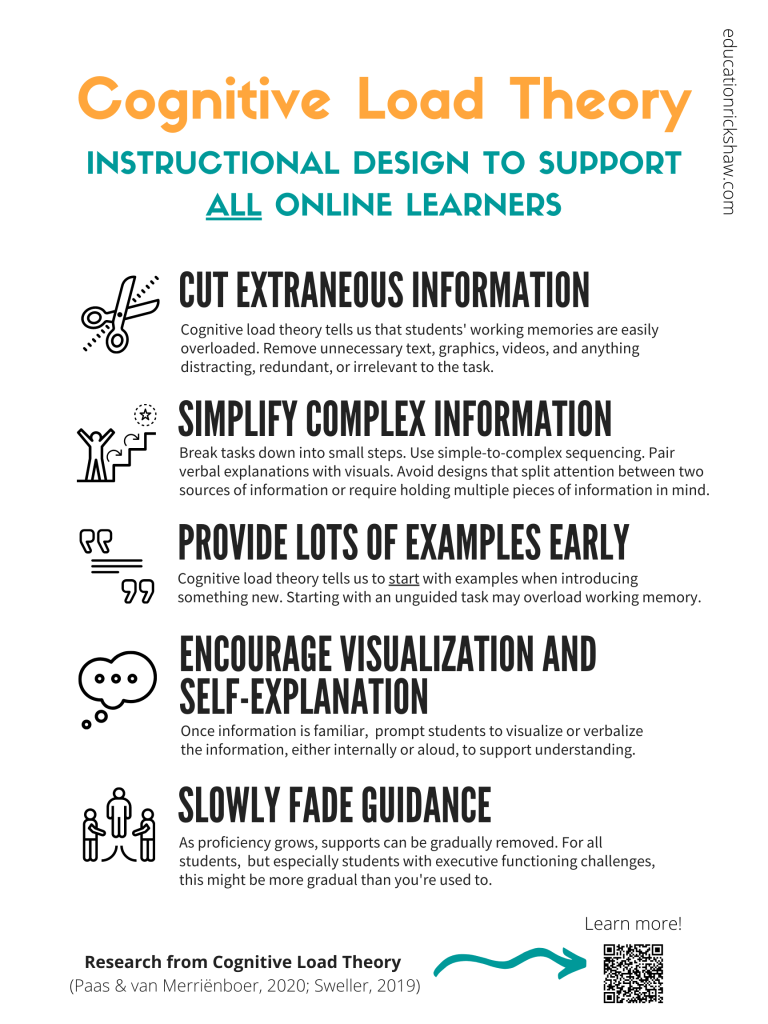
I actually came across the Paas & van Merriënboer article when reading Groshell’s blog post on CLT and instructional design. He was able to take the strategies from the article and put it into a digital poster to help spread the word on CLT (image included below – spread it around!).
Pass & van Merriënboer discuss CLT in relation to three different components —
the individual learner,
the learning tasks, and
the learning environment.
Each plays a role in contributing to either increased or decreased amount of working memory being used during a learning activity. It is the job of the instructional designer to craft an environment that permits the maximum amount of working memory to be spent on the learning task and not on extraneous cognitive load.
The Saas & Van Merriënboer article references Sweller (2020) and the application of CLT to educational technology. With the increased use of educational technology in instructional design, we need to proceed with caution to be sure the technology does not cause additional load on the learner’s working memory. The technology should be used to enhance the learning experience, not hinder it.
Do you see a theme here? There is so much being asked of instructional designers when crafting a learning experience, training session, or full course development — the learning theory behind it, the technology used to build it, the customer service skills required to work with a subject matter expert, and most importantly — the individual needs of the unique learners who will participate in the end product. This challenging field is becoming more and more necessary as higher education navigates a post-COVID instructional environment.
This is actually why I started researching learning engineering, as I mentioned earlier in this post, with a goal to understand the differences in the various job titles associated with the broad scope of the instructional designers role. My current role is shifting departments and we are attempting to document my role in educational technology as it fits within the course design team. As we consider the development of additional learning opportunities beyond just courses, learning engineering is a field that might be broad enough to capture the data collection & problem-solving skills at the front of the design as well as the creative process involved in crafting activities while also sitting in a system being utilized by teaching faculty and students with an ever-changing demographic. Stay tuned for more on how the new department shapes up.
Until next time, thanks for learning and reflecting with me.
Paas, F., & van Merriënboer, J. J. G. (2020). Cognitive-load theory: Methods to manage working memory load in the learning of complex tasks. Current Directions in Psychological Science, 29(4), 394-398. https://doi.org/10.1177/0963721420922183
My professor, Dr. Scott Warren, made this statement in our Zoom class this week. It fits directly with my personal learning theory shared previously in that learning is only achieved through cognitive processes of the individual learner. Each learner is unique, yet has similar physiological and social constructs that either assist or hinder their learning. Ultimately, the goal of instructional design is to create meaningful learning experiences with the individual learner in mind. When we consider the unique presence each learner brings to the experience and how learning occurs best within a known context, authentic assessments can be a rewarding activity for the learner to complete and not just a task they need to check off. We learn when we engage with material in an meaningful way, and by creating assessments of learning in which the learner authentically demonstrates their understanding, the instructional system becomes most successful.
Analysis of an instructional problem
This week in our Instructional Systems Design course, we are working through the analyze phase of the ADDIE model. While I’ve built training in the past and taught various courses, I have not utilized specific analysis strategies or questions to gather the necessary information at the start of a project. Our text (Piskurich, 2015) provided numerous assessment options, including a performance gap analysis and a training needs assessment tool. I utilized the following questions in my initial research —
What do learners they need to know that they are not currently learning?
What is the instructor’s philosophy of learning (how do they think people learn/how should they teach)?
What does the instructor need help with teaching?
What environmental affordances are in the learning environment that limits what can be done to improve learning and what can be used to improve it?
What specific learning objectives should the training focus on?
What types of instructional technologies are best suited for this type of instructional that will support learning?
I am working with a colleague who manages the project management office (PMO) at the university who needs to implement a project lifecycle framework for all university projects. Various department representatives could serve as a project manager for either their department or for the university initiative. These individuals usually have limited understanding of project management strategies and need a crash course in how the university organizes and prioritizes projects, as well as how funding, human, and IT resources are approved for the initiative. Her ultimate goal is to provide an overview of each phase of the project lifecycle framework to assist individuals in completed a Project Roadmap document. This document is used to submit various requests to committees, but also helps track all parts of the project in Smartsheet. Smartsheet is used to create dashboards for leadership to track projects and assign resources appropriately.
There are usually two groups of people who need support through the PMO — department heads needing a project manager or members of university committees assigned as a project manager for an initiative. A training course on the project lifecycle could transition an office of three people to more of a consultation office as opposed to project management office. In thinking through the ultimate goal of the training, assisting individuals in completed the Project Roadmap document makes the most sense for a summative assessment — and bonus, it’s an authentic assessment! The course can be separated into short modules focused on individual phases of the project lifecycle, each module ending with the completion of a component of the Project Roadmap. Moving from knowledge of the individual phases into immediate application of this information to their own project will help the learner retain this knowledge for future projects.
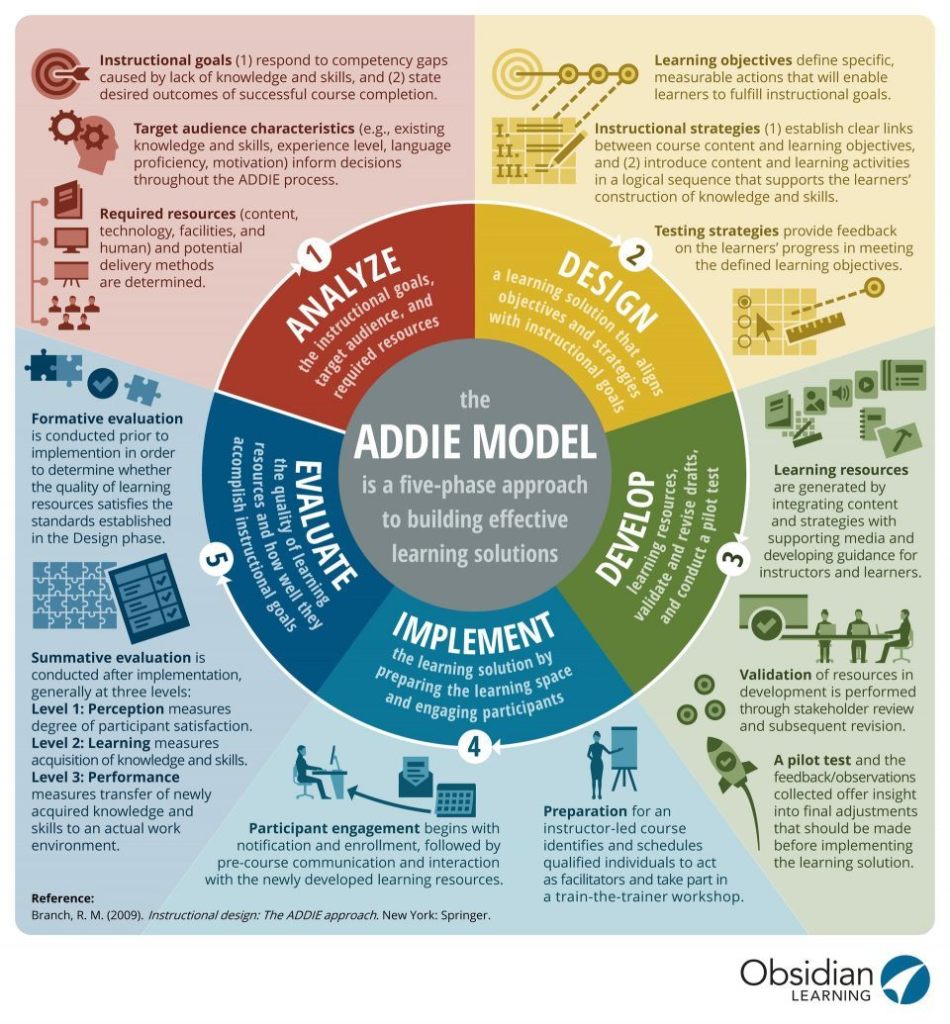
The infographic above captures beautifully the process I’ve started with my colleague. Identifying the target audience took two meetings to finalize. Initially, we thought an overview video for those interested in a high-level understanding of the lifecycle would suffice. But the more conversation we had, it became evident that the true need was to support these folks who had limited understanding of project management techniques but were being asked to manage projects. How could we support them better and assist them in drafting the Project Roadmap at the same time? I’m excited to start designing the individual modules that enable the learner to acquire the knowledge they need and then immediately apply it to their specific project.
Connecting Analysis & Design
Nichols Hess & Greer (2016) documented their personal experience with utilizing the ADDIE model to redesign an online information literacy course, as non-instructional designers. They spent considerable time reviewing problems with the past coursework, understanding instructional design theory and process, as well as gathering data from past courses as part of the analysis phase. Analysis should be where instructional designers spend a good deal of their time in working with subject matter experts (SMEs). In this particular case, the designers were also the SMEs which can be both an asset and a detriment. This combined role could result in a poor analysis of the true problems needing to be solved if the problems are not identified correctly. Piskurich (2015) recommends having other instructional designers review the analysis and design documents. A non-bias set of eyes can poke holes and ask additional questions to ensure your design is meeting the analysis, and to be objective about what the true problems are needing solved. Without the analysis component, time and money are wasted on developing instruction or training that may not be needed.
With the analyze phase being so critical, I found it interesting that the iDesign IDEA book presented limited information on how and why this phase cannot be missed. This book was introduced to me through the EDUCAUSE Learning Technology Leaders Institute that I completed this spring. The book serves as a crash course in instructional design with resources focused heavily on the design and development aspects of the ID process. It clearly indicates (even in the title of the company) that the book has been created to assist faculty in designing learning experiences. As an open educational resource, it serves to promote quality instructional practices in order to create learning experiences that have a lasting impact on the learner. It’s truly a phenomenal resource. However, without enough focus on analyzing specific characteristics of the learners, the design might miss key aspects of what a learner might need to know. There is a specific section of the book dedicated to writing learning objectives, but without an analysis of the learning problem to be solved by the course and clear picture of the overall learning goals, the objectives may not accurately reflect the needs of the learner. While I have provided a critique of this particular aspect of the book, I cannot recommend the iDesign IDEA book enough for any higher ed faculty member looking for design strategies as they consider transitioning from a primarily campus-based course to a blended model for instruction this fall.
Summary
We know learning takes place with the individual learner as a cognitive process. Human cognition takes place within the brain. In order to design effective learning activities, we need to know how the brain works. The brain has a section dedicated to visual elements, a section for auditory components, a section that focuses primary on the affective domain of learning (obviously I’m oversimplifying here). These structures combine past learning with the individual’s current state to help the individual be ready to learn. Instructional designers play a role in helping the learner feel safe and comfortable at the start of the learning process. A thorough analysis of the learning problem can lead to the design of a safe learning environment for any learner to thrive.
Until next time, thanks for learning and reflecting with me.
References
Nichols Hess, A., & Greer, K. (2016). Designing for engagement: Using the ADDIE model to integrate high-impact practices into an online information literacy course. Communications in Information Literacy, 10 (2), 264-282. https://doi.org/10.15760/comminfolit.2016.10.2.27
Piskurich, G. M. (2015). Rapid instructional design: Learning ID fast and right (3rd ed.). San Francisco, CA: Pfeiffer. ISBN-13: 978-1118973974
Learning is a complex process involving cognitive and physiological processes as well as social and cultural constructs (Goldstein, 2019). But the design of the instruction can deeply impact the effectiveness of learning experiences. Sparking an emotional reaction, either through joy or fear or curiosity, results in more effective encoding to long-term memory (Goldstein, 2019). But how does the field of instructional design help aid in these emotional experiences?
I enjoy TED Talks. The presentations are well-designed and engaging because of how they are structured through story and real-world application. As a StrengthsFinder Learner, these short snippets of information offer little knowledge nuggets to help improve my personal well-being or how I do my job. What is fascinating to me though is the longevity of the talk and how the information sticks with me when it is usually only 10-12 minutes in length — it’s the design of the talk that helps with the retention. TED Talks are centered around storytelling. Humans are storytellers by nature and we have evolved over time because of the stories we tell ourselves or the stories we’ve been told. This is essentially an instructional design practice, and a highly effective one considering the popularity and impact of TED Talks today.
Think about the last TED Talk you watched or listened to. It started with an engaging introduction to ground the audience in a real-world problem, then shifted quickly into a personal story from the speaker. That quick transition helps to set the stage, then dig into the personal narrative so you can feel as though you are connected to the speaker in some way. Most often the speaker will ask you to “imagine yourself…” somewhere doing something. This is to help place you in the scenario and creates an emotional connection to the message or lesson the speaker is trying to convey. We know from cognitive science researchers that an emotional experience transitions to and holds in long term memory better than one without emotion involved (Goldstein, 2019).
Where joy hides and how to find it
TED Talks usually finish with a call to action asking the viewer/listener to take this information they just received and apply it to their daily life or make an impact on the world somehow. My most favorite TED Talk is by Ingrid Lee (2018). She is a designer who started studying joy – not happiness, but joy. She talked about how happiness seemed like a lofty goal, but moments of joy throughout the day created a sense of happiness and contentment. As I listened to her story, I started to understand why I love sprinkles so much (it’s because of the multiplicity and abundance) or why a space with a round mirror always made me feel good (round objects feel safer than sharp edges). Physical attributes lead to joyful spaces. Her talk led me to purchase her book, The Aesthetics of Joy, which ultimately led me to her website with the same name. The structure of her talk truly helped me see differences between joy & happiness and shift my thoughts to finding my joy in the spaces around me.
One of these lessons, that pops of bright color lead to joy, is most evident in her blog posts. They contain beautiful pops of color that spark emotion when you read the words. One of the posts, 10 Ways to Start the Day on a Joyful Note (Lee, 2021), stands out as one with both high and low quality design elements. Obviously the goal of the post is to share a list of practices to help begin your day on a joyful positive note. As someone who struggles with depression, I am constantly on the look out for opportunities to create a joyful space as it helps me to shift from the internal ramblings of my mind to the physical space around me. As I read through this particular post (mind you this was over a month ago and it has stayed with me), the most impactful items listed were the suggestions with pictures included. It’s amazing how that small act of adding a visual example helps the brain remember what was read over just words. Adding flowers to the bedside and color to the bedroom were the most remembered from the list because of the images she included. Reading a poem or listening to a book didn’t stick with me because there was no visual element in the post.
Mobile-first = Equity in education
Three essential components of effective instruction, as told by Merrill (2008), include a demonstration of what is to be learned, a chance to apply what is being learned, and to do all of this in the context of real world scenarios or problems. TED Talks include these key strategies which is why they are so impactful. Storytelling is an effective way to demonstrate what is to be learned, so I thought I would wrap this up by sharing my own TED Talk of sorts created to help transition our faculty team to a mobile-first learning management system (LMS) in a super quick timeframe (4 months)…in the middle of the pandemic. Students needed to access learning materials from a phone or tablet, and our current system wasn’t designed for mobile. In an effort to build awareness around the need for mobile delivery to improve access, I was asked to share my “Why” based on volunteer work I have done in the Dallas community. A colleague helped me craft the presentation based on similar principles of TED Talks. Last fall I delivered it live to over 500 faculty and staff. The linked presentation is a recording I did to share this work with an EDUCAUSE learning community, but it helps demonstrate the power of storytelling and use of effective visuals to convey an impactful message.
Summary
The goal of this post was to share examples of instructional design in the real world and offer my own use of these strategies as both an individual and a learning technologist. I am finding the reflective nature of blogging is helping me to better understand design principles and force the strategies I’m reading about to sink in a new way. I look forward to comments and ideas on how the design of effective instruction has impacted your world.
Goldstein, B. (2019). Cognitive Psychology. 5th ed. California. ISBN: 9781337408271.






 heather zink. a learner.