I’m at OLC Accelerate 2023 in DC this week. An annual connection to friends and colleagues paving the way for innovation in digital learning. The Online Learning Consortium has been a home for me since my first conference in 2010. I thoroughly enjoy sharing ideas and learning from others (read: serial learner wanting to be surrounded by learning professionals). I would invite you to also consider whether you have a professional network space you are connecting with yet. If not, let’s chat about how to get you to the next OLC event.
Last year I met Melissa Hortman, an amazing thought leader in higher education working for Microsoft, and knew quickly we spoke the same language. Fast forward a few months and AI was everywhere with the launch of ChatGPT. Melissa and I had met a few times since October 2022 and decided we needed to present together; OLC Accelerate was the perfect spot. Both innovators on the technology adoption curve and excited for all that AI could bring to our professional lives as educators, we knew it was the perfect topic for a proposal. So, here we are, 9 months later and sharing practical strategies for implementing disruptive technologies.
You need a strategy, you need to be intentional about your work, and it will benefit both you and your students. Our slides and handout are linked in this post. We’d love to continue this conversation on LinkedIn if you have any questions.
I’m presenting this week at the Association for Continuing Higher Education, Inc. 85th Annual Conference in Charleston, SC. I was asked to present by my colleague, Cristi Ford, at D2L to share a journey I’ve helped to support at Graduate School USA this year with the implementation of D2L Brightspace for virtual instructor led classes. My presentation slides are linked here for reference, and I hope you’ll find value in the challenges we faced with implementing new technology and navigating a digital transformation effort coming out the pandemic.
Do you need a quick start guide for you or your team to learn more about Microsoft 365 and its suite of apps? I was able to pull together some of Microsoft’s best free training elements into one spot. Take a look at the Rise360 tutorial I built for a recent UNT course.
Another opportunity to create an infographic using Piktocharthelped me to see the benefits of this ‘new to me’ platform. I enjoy the visual presentation of information and found the platform much easier the second time around. I like the playful images and icons available helped me find joy in this process. The various icons for social media helped me to create this presentation.
Let me know how you are using social media in your classes. Blogging and Twitter are by far my favorite platforms, but I am starting to see opportunities with TikTok and Instagram for sharing videos. Plus, they are just fun and sometimes we need to make sure we incorporate a little fun and not take ourselves so seriously.
And on that note…I’ll share my TikTok account…where I create #plantmom videos every so often. Don’t tell my teenagers…
A fun project to work on in my Online Design & Pedagogy course – the research continues to show the benefit of a blended course as face-to-face connections offer additional depth that has not always been possible in online learning. However, with the invention of synchronous collaboration platforms like MS Teams and Zoom, students and instructors can meet in a similar fashion without needing to come to a physical campus.
I’m looking forward to seeing the continual sharing of best practices that have resulted from the pandemic and the shift to emergency remote learning.
As software-as-a-service (SaaS) tools become more pervasive in the learning technology world, support for these tools continues to evolve. Migrating from a hard copy user manual to a digital handbook and, more frequently, a continually updated web-based help site increases access to support materials in a user-centric way. Interestingly, as software companies adopt and utilize agile development processes, the agile design teams prioritize a functional system over clear documentation (Behutiye et al., 2022). This is challenging for the end-user and presents difficulties in adoption, especially for educational institutions that rely on training departments to assist the end-user. The advent of online user communities by SaaS providers has helped users stay connected in cases where documentation lacks. As the director of academic technology, I am continually working with a team to produce training materials for students, faculty, and staff. The online user communities have benefits and drawbacks, depending on the product and how the company has decided to organize the community.
Blackboard Community
Blackboard, Inc., now owned by Anthology, has a well-established user community of which I am a member. While this service has significant benefits to connect Blackboard users across the globe, signing up for an account is required before viewing any of the community information. A Getting Started page (video linked above) has been designed to provide a video overview of the community and answer brief questions, but I found it frustrating that I was required to signup to even view information. The benefits, on the other hand, are access to more experienced users of the platform, badging opportunities recognizing a user’s commitment to the platform for various professional development opportunities, and recorded webinars on recent updates and important topics for training departments. The searchability of this platform needs some work, but if you are willing to dig through some of the high-level menus, most of the time information on topics of interest is categorized well. I do not tend to post to online forums, but I do have team members who find these features valuable.
Another online community used frequently at our institution is the Microsoft Teams Tech Community. This forum is designed to provide users quick access to information and an easily searchable interface. I do not post to this forum, but I do find huge value in the information provided. Microsoft Teams is a user-friendly platform with familiar iconography, but the continual updates to the interface can be overwhelming at first as small changes feel larger when you’re using it on a day-to-day basis. The forum has offered comfort in my frustration with certain features, and guidance on how to tackle common user concerns as well. Without the need to establish a user profile to find information, the barrier to finding information has been removed. Thank you, Microsoft, for recognizing that I don’t always have the time to create a profile for a quick answer to the different types of screen-sharing options or variations in audio controls.
Online user communities were created to serve a purpose. Software companies following agile development processes quickly saw that their ability to maintain clear, consistent documentation while pushing new features into the marketplace would never meet user demand (Behutiye et al., 2022). Allowing customers to help each other and quick pose questions to a larger user group benefits both the customer and the company. For the user though, a level of vulnerability is required to post to a forum admitting you have a question about a topic that may be available elsewhere. The fewer restrictions placed on the user to find information or post information may improve their confidence in posting to a forum. Even so, relying on user communities to serve the support needs of the company needs to be reexamined, as does the continual push to provide a variety of features at the detriment of proper documentation. Software providers who can find a better balance of agile development with user support documentation will succeed further in the marketplace.
References
Behutiye, W., Rodríguez, P., Oivo, M., Aaramaa, S., Partanen, J., Abhervé, A. (2022). Towards optimal quality requirement documentation in agile software development: A multiple case study. Journal of Systems and Software, 183, 1-17. https://doi.org/10.1016/j.jss.2021.111112
Good design is user-centered, no matter the product (Ruiz, Serral, & Snoeck, 2021). When it comes to designing mobile applications, designers must consider a smaller user interface (UI) that offers similar functionality to a desktop version of the same application. At the same time, mobile users are not always interested in the same features. Function aside, the visual experience for the mobile user is most definitely part of the choice to use one app over another. Designers must also consider the form or fashion elements of the mobile UI. In her 2018 TED Talk, Ingrid Lee, designer and self-identified joy-spotter, discusses the importance of finding joy in design and that tangible parts of our environment can lead to more joy in our lives.
Lee’s research into physical objects that lead to joy tells us that confetti and sprinkles are joyful, as are symmetrical objects like snowflakes or pops of color from rainbows. Some of this connects back to our evolution as human beings finding nourishment in ripe, colorful fruits in the treetops (Osorio & Vorobyev, 1996). What designers can take from this research is the fact that human beings are in search of joyful experiences, and with the choice of so many apps for the same types of function, the UI design must create a welcoming experience to be successful.
Apple Weather: Good balance between function & fashion
While only receiving a 3.8 out of 5 stars rating, Apple’s Weather appis a great example of joyful, thoughtful design with high functionality. The simplicity of the UI provides information about the weather for the day without overwhelming imagery. The icons used to depict various types of weather are commonly used across the web and the font choice is sans serif leading to improved accessibility. The playful nature of the graphics for various types of weather provides an immersive user experience. When it’s raining outside, it’s raining in the app with the details listed on top of the weather imagery. Even the screen that enables the user to see multiple cities at once has animated weather from each city. The high/low temperature menu was also recently updated to provide a more graphical display of the temperature with appropriate color used to signify cooler versus warmer temperatures. Apple designers are well-versed in color theory and joyful design. While ratings may not be high for the level of detail some users are seeking from a weather app (from only 666 ratings), users continually return to Apple’s Weather as a choice for visual appeal and easy-to-find weather information.
screenshots of Apple’s Weather app
Amazon Shopping: Poor balance between fashion and function
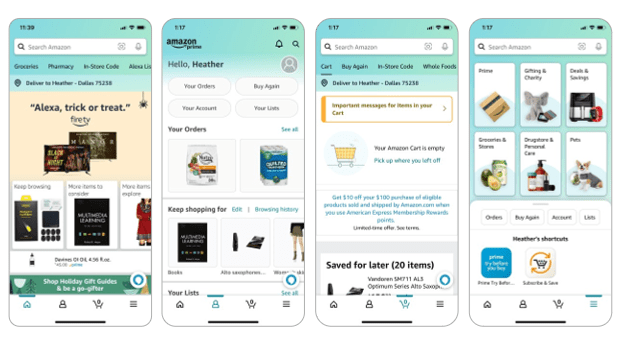
With 4.6 million ratings, Amazon Shopping receives a 4.8 out of 5 stars. It is obvious from the screenshots displayed in the App Store that Amazon has prioritized function for mobile users in the form of shipping notifications, changing your password, visual search features while in a store, and live chat support. These are important features for users on-the-go. However, the UI design follows no logical pattern for color theory with an aqua/minty blue green used in spots with brown packaging also mixed in. The opening screen has too many choices for users on such a display it is difficult to know where to start and users may become too distracted and not remember why they even opened the app in the first place. The icon choices have no words and are not intuitive for a novice user to know where to start unless you are simply looking to search Amazon for products. Sharp edges and too many visual menus do not meet the previously mentioned joyful design standards.
screenshots of the Amazon Shopping app
References
Osorio, D., & Vorobyev, M. (1996). Colour vision as an adaptation to frugivory in primates. Proceedings of the Royal Society: Biological Sciences, 263(1370), 593-599. https://doi.org/10.1098/rspb.1996.0089
Ruiz, J., Serral, E. & Snoeck, M. (2021). Unifying functional user interface design principles. International Journal of Human–Computer Interaction, 37(1), 47-67. https://doi.org/10.1080/10447318.2020.1805876
Welcome NCCI Colleagues to my tiny corner of the internet! I use this blog to reflect on graduate school topics, usually ideas around instructional design, educational technology, and innovation in higher ed.
I am hosting a Power60 session on Tuesday, September 28 for NCCI (The Network for Change and Continuous Innovation) as part of a professional development series around creating a better normal at work, post-remote work. Having worked remotely since 2008, I have grown as a remote employee and will be sharing some of my strategies for success in the session.
Below are links to resources I speak about in the session. I’m hoping to add to this list based on the feedback from participants during the session. Check back for more later!
Enneagram Institute – I’m a one. Learning this changed how I see myself & others.
StrengthsFinder – My top 5 are RESPONSIBILITY, LEARNER, ACTIVATOR, FUTURISTIC, COMMUNICATION.
The last eight weeks have been both rewarding and challenging as I navigated my first formal instructional design course at UNT. I can wholeheartedly admit that I have a deep appreciation for instructional designers (IDs) and complexities of this role than ever before. I am also excited about using what I’ve learned in this course in my current role as I work to build a team that researches new edtech tools, evaluates current edtech strategies at my university, and develops training materials to support our faculty.
As the theme of the summer has been one of reflection, both professionally and personally, this post is filled with what I’ve learned, the importance of course material/textbook selection, and where I’m headed next.
A few lessons learned about instructional design
1. The development of elearning content is much more complex than the tools convey.I have a knack for grasping edtech tools relatively quickly. It may be because I’m not afraid to click a button or try something out and completely delete it later (no matter how much time it took to create). I’m not sure where this skill comes from, but I’m grateful to have it. This ability to quickly learn a tool, however, did not help me when I was the designer of the learning experience. There is a separate skill set required to examine the content, select the appropriate method for displaying/producing the content, and consider the individual learner’s needs at the same time. I would guess some individuals have both the design and the development skill, but I would argue that in order to create exception courses/training materials that you need a team with the ability to specialize in one or the other. In short, quality instructional design requires a team.
2. Templates and examples are essential, both for new instructional designers and students in any course. Providing a course design template or instructional engineering document to an ID offers a bit of structure for all the creative energy required to develop a course. It also follows what we know about cognitive processing in that priming the learner through applicable examples can help them move from knowledge to application of the knowledge more quickly. Too much new information overwhelms working memory.
The same was true in my course development in that new project managers need to see completed project documents from a past project in order to see how their project fits into a similar framework. In short, learning occurs in context (Driscoll, 2002), we must always provide examples and/or templates.
3. iterate. iterate. iterate. An agile approach to instructional design allows for iteration throughout all stages of the ADDIE model. This is the most valuable lesson I learned this summer. Getting something for the client to look at quickly allows you to make tweaks to the design throughout both the design & development process. It will also ultimately save you time in the development stage in case there is a flow to each module related to structure of the content items. Solidify Module 01 before creating Module 02 — fix it once, as opposed to seven times in seven modules. (I did not do this, but will most definitely do it next time). Rapid design and development will benefit you in the long run. In short, spending more time up front will save you a lot of time later.
Course resources: Know your audience
We used Piskurich’s 3rd edition of Rapid Instructional Design: Learning ID Fast and Right for the course. I found it helpful in terms of templates for specific types of learning experiences. He shared a fantastic survey tool to gauge learner satisfaction upon completion of the course. However, because of the approach to the writing, I struggled to want to read the text. I wanted less conversational writing and more structure how-to’s. The author spent more time trying to figure out how to give all audiences — from novice to expert — something in his book when his time would be been better spent focusing on one group. When you flip back and forth between introductory and mastery level material, the flow of the text is not helpful to either audience.
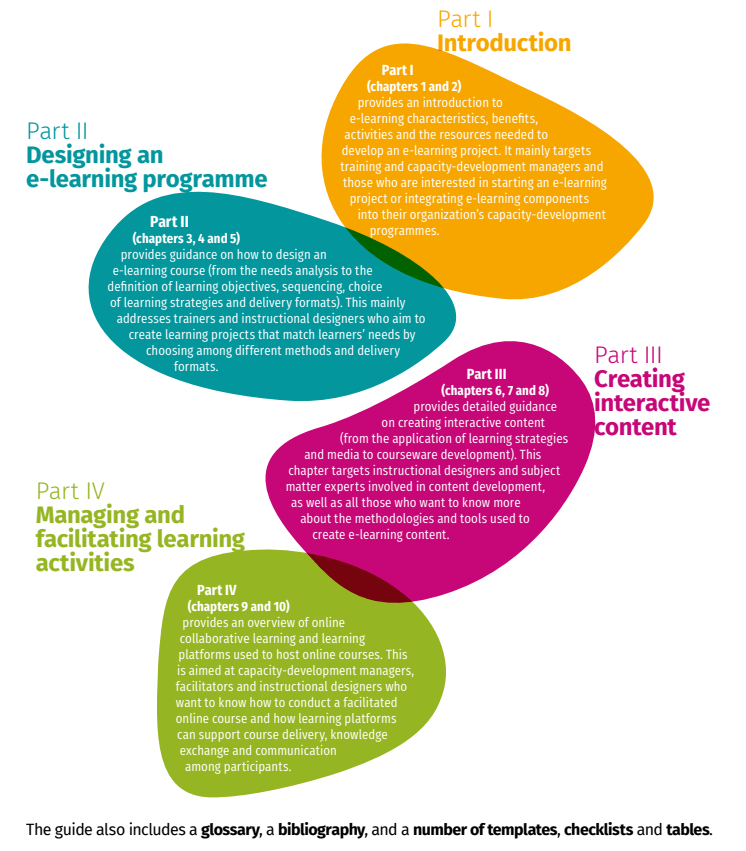
My thoughts on the text may also be clouded by the fact that I developed elearning modules over face2face training. While the author mentioned elearning, the focus of the text was primary for classroom-based course design. Our professor did share the FAO eLearning methodologies book that I found amazingly helpful. The structure of the text focused on core aspects of instructional design that apply across any course/training module, but keyed in on particular aspects to consider for how to chunk content depend on the goals of your elearning module, interactive creating interactive content with various courseware options, and the management of course facilitation depending on learner needs.
Table of Contents for FAO (2021). E-learning methodologies and good practices: A guide for designing and delivering e-learning solutions from the FAO elearning Academy, second edition. Rome. https://doi.org/10.4060/i2516e
The FAO methodologies resource and the iDEA Book by iDesign that I have shared in the past are fantastic tools for instructional designers and faculty designing online courses this fall. They provide both the background on instructional design as well as practical tips and easy-to-follow guidance for utilizing instructional design that benefits individuals at any level of experience.
The field of instructional design
I am a learner and an educator. I possess a deep desire to constantly improve and learn everything I can about a given topic, and right now I am most interested in how humans learn and the most effective strategies to help them learn. The field of instructional design captures all my interests and presents opportunities for growth as society changes and new technologies or challenges present themselves. Humans always need to learn something, we are constantly evolving as a species. There is also so much to research and evaluate within the field of instructional design as it relates to elearning and the use of multimedia.
I am not looking for a new job, I love my team and the direction our work is headed. However, I am grateful for UNT in providing this course with the learning technologies graduate program as it provides a springboard into the ID field that opens doors for students while also providing immediate applicability to their current jobs. As COVID continues to impact our working world, instructional designers will become increasingly valuable commodities to assist corporations and educational institutions in migrating to a more fluid workforce. The lines between home and work will blur permanently. This requires learning across generational boundaries, and instructional designers are just the group to help us navigate this new space.
As always, thanks for learning and reflecting with me.
Instructional design should be an iterative process. My current UNT course on instructional systems design has setup multiple opportunities to reflect and review the course we’ve been designing for a chosen client. With my client being a department at my university, it’s an opportunity to ensure a quality product for the university while also practicing my instructional design skills for future courses. In considering various activities for learners in the training course I’ve designed, most of the activities I offered were based on the tools provided by the Rise360 platform and my own preferences for learning new information. The concept of visualization was presented by our professor through an activity called the method of loci. According to The Art of Memory, Inc., the method of loci is a “method of memorizing information by placing each item to be remembered at a point along an imaginary journey. The information can then be recalled in a specific order by retracing the same route through the imaginary journey.”
A memory palace example from The Art of Memory, Inc. to assist with the method of loci technique.
Our professor shared this technique and asked that we practice it while using Wilson’s view of situated instructional design as something to memorize. While this is not difficult information to grasp (for more on Wilson check out his Google Scholar page), it was new to me. This is a new technique and new information, it was challenging to grasp both at the same time. The cognitive load was too great to fully lean into the technique and reap the benefits of the visualization exercise.
However, I think with a few modifications it could be a useful exercise in an online course.
First, the information to be memorized should be presented through a separate means ahead of the exercise. Had I been given an article to read on Wilson’s view of situated instructional design instead of citing the key points to memorize I may have been able to connect the visualization to my past knowledge gained after reading the article.
Second, audio instructions may have helped with the explanation of the activity. By having to read instructions on a screen for a visualization activity, I was unable to close my eyes and truly visualize.
And third, using a simpler example to learn the method of loci technique then applying it to something more complex, like Wilson’s instructional design, would have been more effective. Possibly using a sequence of colors or numbers and placing them around a room would have been enough to see the effectiveness of this memorization technique.
I’m reminded of Mayer’s principles from his cognitive theory of multimedia design. The pre-training principle, one that falls under the category of managing essential processing in order to focus on the actual material needing to be learned, that people learn better from a multimedia lesson when they know the names and characteristics of the main concepts. It’s possible that if I had learned the method of loci technique with less complex information ahead of time or if I had seen Wilson’s articles on instructional design ahead of the exercise that I would have found greater value in the method of loci. Nevertheless, I find visualization activities do have value in learning new material, but for an online lesson will need the use of audio to allow the learners to actually close their eyes and lesson to the visualization instructions if it’s the first time they are experiencing the technique. In fact, this technique could be valuable for the type of training course I’m working on currently as learners could visualize the phases of the project framework to assist in memorizing the phases for future use.
ADDiE – implementation
Visualization is a form of reflection in that you are recalling information from long-term memory back into working memory to use it again. I am finding great value (as I’ve mentioned in nearly every post this summer) in reflection to reconsider design aspects of the course I’m working on. In planning for the implementation of the training course, I sent my thoughts to my client for review. She and I both are questioning the location in which to store the course materials where they can be be most beneficial for learners while simple to maintain for the client. Microsoft Teams is a potential solution for the virtual ‘home’ as it can also be used for collaboration among the learners after the course is completed as well. Project managers at the university are distributed throughout various departments and could find value in a spot to stay connected. Microsoft Teams is designed for this specific task.
In spelling out potential issues with the current state of the course materials, I called out the use of Microsoft Excel as a stand alone document for the Project Roadmap. This caused the client to start thinking about other options. As I am the instructional designer for the course as well as a learner within the course, I mentioned the use of Teams as a solution for housing the documents to ensure version control for the ASI Office but also for learners to submit as part of the course completion. This allows for others learning project management strategies to see other examples. It also keeps these individuals part of a learning community by which they both contribute to and learn from.
I am constantly considering how learning communities are a system whereby we contribute and receive information leading to new knowledge creation over time. Considering a systems approach to a training course fits with the Agile approach to project management the University is moving towards with regards to any technology rollout. Offering opportunities to practice the use of Agile within any aspect of the University will help employees grasp the concepts more easily.
addiE – Evaluation
The use of Teams for housing course materials also allows for surveys to be open for all users and data to be immediately reviewed through the use of Microsoft Forms. The University is attempting to grow the use of the Microsoft tools across all departments to cut costs with other providers (like SurveyMonkey). The Microsoft Automate tool is also a helpful feature to setting up notifications anytime a survey is administered or a learner is added to the Team. I look forward to using Teams for this training course, as well as learning more about the tools offered by Microsoft as part of this project.
As always, I appreciate a reflective course assignment as it forces me to slow down and think as opposed to ‘just do’– as an Enneagram One, I tend to be a doer and live in the present moment. The reflective aspect of instructional design and the iterative nature of the work are helping me grow not only as a professional, but also as a more competent human being. I’m glad to have you on this journey with me.
Until next time, thanks for listening and learning.











 heather zink. a learner.